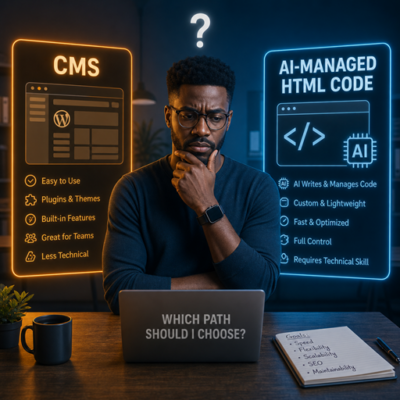
When Using AI to manage HTML – Makes Blogging Feel Like Work
Yesterday, I set a deadline for myself: write a blog post by the 16th. Simple enough, right? Except when you’re maintaining a blog in pure HTML, that “simple” task turns into a mountain of prompts, code, and instructions. The blog entry didn’t get uploaded until today.
I started with every intention of writing something insightful. Instead, I ended up here, reflecting on the fact that I’m still maintaining a blog in raw HTML instead of using something like WordPress. And for the record, all that complaining didn’t get the post written any faster.
The Dread of the Prompt
When you’re using AI to help manage a static HTML blog, the process isn’t just “write and publish.” It becomes “teach your assistant how your blog is wired.” That means writing prompts like:
- “Change the header.”
- “Add an entry to the recent posts HTML.”
- “Update the category file.”
- “Relink the previous post.”
- “Confirm the breadcrumbs.”
I am not sure the above example truly shows what real prompts look like, so I should be more exact here. Here my friends, is my exact prompt :
You are an expert web developer assistant helping maintain a static HTML blog. I need you to add a new blog post by completing all of the following steps in sequence. Execute each step completely before moving to the next.
**Context you need to gather first:**
- Read the most recent existing post in `/blog/` to determine the current "last post" filename, title, and its navigation link structure
- Read `/blog/index.html` to understand the post entry format
- Read `/blog/category.html` to understand the count format
- Read `/blog/recent-posts.html` to understand the entry format and confirm there are currently 4 entries
- Ask me for: post title, slug/filename, category, date, and post content — then proceed with all steps below
---
**Step 1 — Create the new post file at `/blog/3quick-fix.html`**
- Mirror the structure of the most recent existing post exactly
- Set the **next nav link** to point to the most recent existing post (this new post is older in nav order, so "next" goes to the last post)
- Set the **previous nav link** as empty/placeholder (to be filled when a newer post is created)
- The title of the blog post is "3 Website Fixes That Get Small Businesses More Calls This Month"
- The featured image for this post will be /img/blog-post4-final.png
- The category for this post will be "Web Design"
- The meta keywords will be "small business website fixes, Chicago small business marketing, website conversion tips, get more calls from website, local SEO Chicago, website CTA optimization, small business web design, NAP consistency SEO, homepage hero rewrite, click-to-call optimization, service business website tips, SiteCraft Studio"
- Contents of the post will be provided later
**Step 2 — Add a post entry to `/blog/index.html`**
- Insert the new post entry following the same format as existing entries
**Step 3 — Add a post entry to the appropriate category file `/blog/blog-category-web-design.html`**
- Insert the entry following the same format as existing entries in that file
**Step 4 — Edit the previous "last post" file**
- Open the file that was previously the most recent post
- Update its **previous nav link** to point to the newly created post
**Step 5 — Edit `/blog/categories.html`**
- Increment the post count for the relevant category by 1
**Step 6 — Edit `/blog/recent-posts.html`**
- Add the new post as the first/most recent entry
- If there are already 4 entries, remove the oldest (last) entry so the list stays at 4 entries maximum
---
After completing all steps, confirm each file that was modified and flag any navigation links or filenames that could not be resolved.
Just bring myself to sit down and write that prompt made me miss my own deadline. There is a part of me that thinks, “Would writing the code be quicker?” The solid and truthful answer is NO!!!!!!! All 6 steps above took less than 2 mins to perform. I might have complain about writing the prompt, but in truth, you see where the saving are.
Final Thought
AI is incredible. It’s transformative. It’s the future. But it can also feel exhausting when you’re forcing it to replicate what a good CMS already does out of the box
So yes, I’ll keep experimenting. I’ll keep training my assistant. I’ll keep refining the prompts that keep this HTML blog running. But I’ll also keep reminding myself that sometimes the simplest tools — like WordPress — are still the best ones for the job.
/img/blog-post4-final.png was a typo…..so I had to correct the html that was created by this prompt. /img/blog-post-4-final.png was the correct name….LOL